This is a product catalogue with categories and search. The cards lead to products and their seller links. They do not reserve stock, collect your agent payment or confirm the current offer.
Use a catalogue that makes the product link easy to find and corrects dead entries. More listings are not useful if the links no longer match the pictures.
How to use Hoobuy Spreadsheet
Open the original listing, select colour, size and quantity, then save that selection. Compare dimensions with an item you own. If the source has several similar options, write the seller’s option name rather than “the one in the picture”.
Example: a navy polo in size M, quantity one, with a request to check chest width laid flat. Replace those details with your own purchase.
How to use Hoobuy
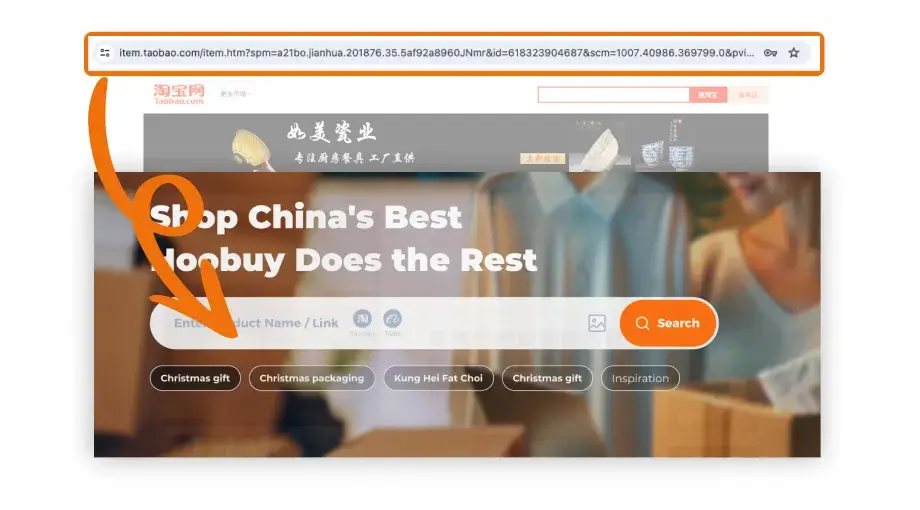
Paste the seller URL into Hoobuy’s product-link search. Review the imported options and domestic shipping before submitting. If the link cannot be read, ask about the manual-order process rather than selecting a nearby-looking product.
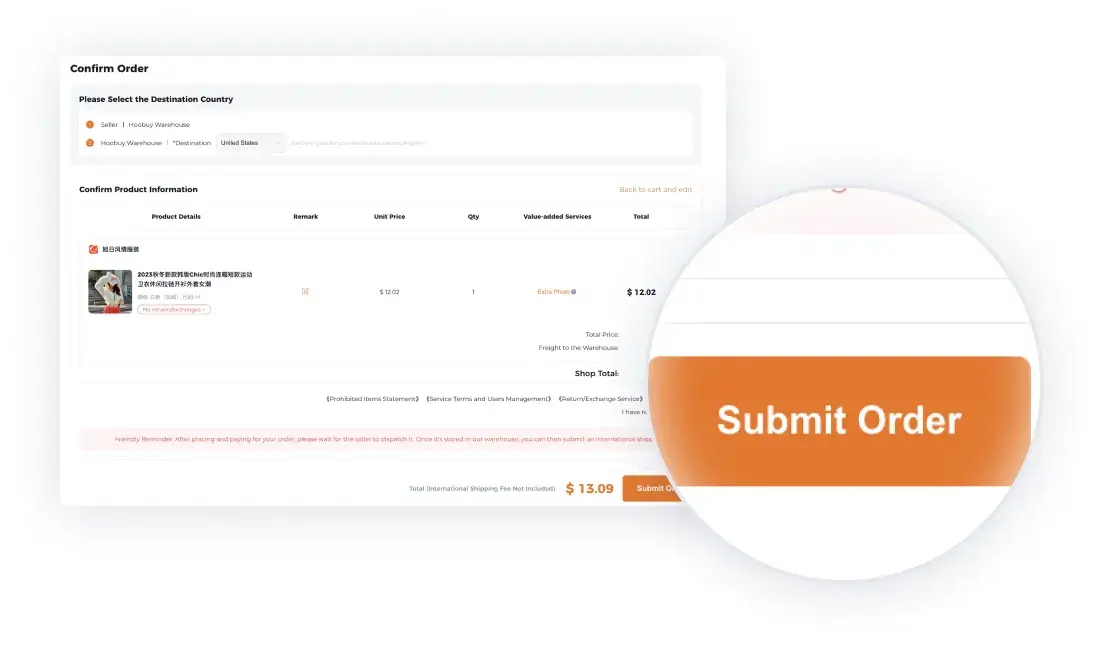
Review the first bill for the goods and applicable buying charges. Keep the order number and receipt. Track seller dispatch to the warehouse, then review the received item.
Once the warehouse receives the item, compare its QC photos with the selected option. Ask for a missing view or a return before forwarding. Choose accepted items for a parcel, check the route, packing and address, then make the international-shipping payment. Retain the parcel number, tracking history and arrival evidence until you have checked everything.
Copy the original seller URL into the product-link search. View the original image.Review the selected item and the first payment. Amounts shown are tutorial examples, not current quotes. View the original image.
How to use this site's tools
Search a product type or use a category to narrow your candidates. The cost worksheet adds six charges you enter in one currency. It is a budget, not a live quote. For a route estimate, enter the real destination, weight and dimensions in Hoobuy’s estimator.
How to choose a Spreadsheet
Open a few actual product links. Do the pictures and selected options match the destination, and can you reach the original seller? Look for specific categories and dated buying notes. An enormous list does not help if nobody can tell which entries still work.
Apply the same checks here. Product availability is decided by the current seller listing, not by the catalogue picture. Use the dated guide notes and follow the original link before committing to an order.